How to Make a Virginia Menino AI Video
Last updated:
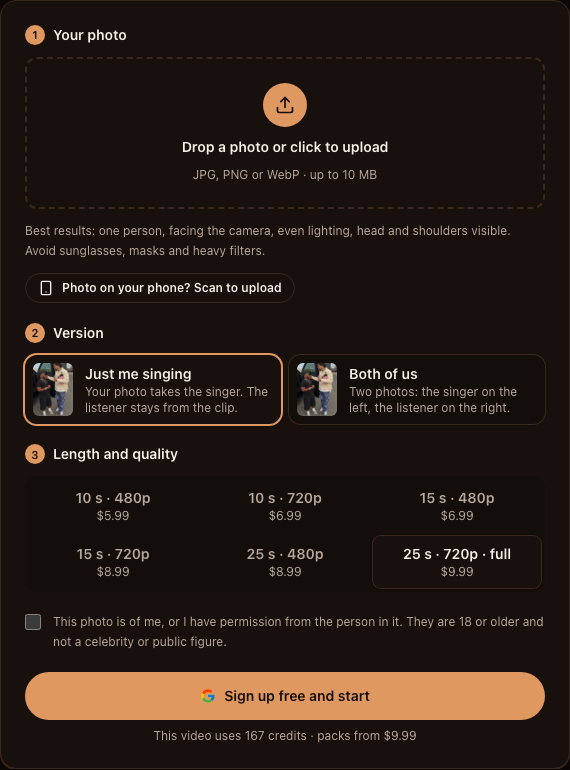
Use Virgínia Menino IA to turn portraits into a parking-lot serenade video. This walkthrough covers the generator from selecting a cast to saving the MP4. It uses a preset motion template; you do not need a text prompt or a recording of yourself singing.
Reference footage and AI remake examples
1. Select the cast and add your portraits
Open the generator and choose “Just me singing” for one portrait or “Both of us” for two. In the two-photo version, the singer goes first and the listener goes second. Check the upload thumbnails before continuing.
Use clear portraits of adults who agreed to appear. On desktop, the phone-upload option lets you choose a photo from your phone. The photo guide covers face visibility, file limits and cropping in detail.
2. Preview the reference and choose duration and resolution
Compare the reference clip and AI example at the same selected length. Shorter options are excerpts, so a different duration can show a different moment. Higher resolution adds output detail but cannot restore a blurry source face.
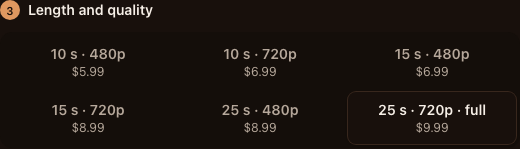
These are the current options for both cast versions on Virgínia Menino IA. Prices are in US dollars; credits are deducted per generation. Check the amount shown in the generator before submitting.
| Length | Resolution | Credits | Price (USD) |
|---|---|---|---|
| 10s | 480p | 100 | $5.99 |
| 10s | 720p | 117 | $6.99 |
| 15s | 480p | 117 | $6.99 |
| 15s | 720p | 150 | $8.99 |
| 25s | 480p | 150 | $8.99 |
| 25s | 720p | 167 | $9.99 |
3. Sign in, review credits and start generation
Sign in when prompted. Your balance must cover the selected video option; if you need credits, review the offered pack before paying. Buying a pack adds to your balance, and starting a generation is a separate action.
Confirm your permission to use the portraits, check the cast and video option, then submit. Follow the task status. If you leave the page, look in My videos before starting another render.
4. Wait for the render and matching soundtrack
The 25-second option is generated in two parts and joined. The matching Portuguese reference soundtrack is added after picture generation. Uploading a portrait does not record or clone your singing voice.
Processing time depends on the queue and selected option. A technical failure returns the task’s credits automatically. A completed video can still have visual imperfections, and a new render uses credits again.
5. Review faces, movement and sound
Watch once for casting, faces and clothing; again for hands, shoulders and the open vehicle door; then with sound from beginning to end. For the longer option, check the join between the generated parts. Exact likeness and lip-sync are not guaranteed.
Inspect the downloaded file too. A crop can hide the listener’s reaction, while changing only picture speed can move the gestures out of sync with the soundtrack.
6. Fix the issue before trying again
Match the correction to the symptom rather than changing every setting at once.
| Problem | Check first | Next action |
|---|---|---|
| The wrong person sings | Cast version and upload slots | Put the singer first in the two-photo version |
| The face drifts or blends | Photo sharpness and face visibility | Use the portrait checklist before another render |
| The wrong moment appears | Duration and matching preview | Select the excerpt you actually want |
| Hands or the join look wrong | Affected frames in the downloaded file | Review the defect before choosing a new generation |
| Sound drifts after editing | Unedited download vs exported edit | Undo picture-only speed changes and recheck the export |
7. Download and share with context
Download the vertical 9:16 MP4 from the generator or My videos. Finished videos are kept for 30 days after they finish, and uploaded photos are deleted automatically 7 days after upload. Keep your own copy while it is available.
Watch the final export after any editing, preserve both people in the crop, and say that the remake was generated with AI. If you add platform music, check that two soundtracks are not playing over each other.
FAQ
Do I need to write a prompt?
No. The generator uses uploaded portraits and a preset video template. The separate image-prompt guide is for tools that accept text-to-image prompts.
Will the result use my singing voice?
No. The matching Portuguese reference soundtrack is added after generation; there is no voice upload or voice cloning in this workflow.
Do I pay again for a second attempt?
A new generation uses credits again. A technical failure automatically returns the failed task’s credits.
How long does processing take?
It depends on the queue and selected option. Follow the task status or check My videos; no fixed completion time is guaranteed.
Your Meme da Virgínia e o Menino moment is one photo away
Create my video