Virginia Menino AI Image Prompts: 3 Ready-to-Use Templates
Last updated:
To recreate the look of the Meme da Virgínia e o Menino trend as a still image, describe the scene before the style: a singer on the left, a laughing listener on the right and a black SUV with its door open. Below are original text-to-image prompts you can copy and adapt, plus a separate reference-photo workflow if you want your own face in the picture.
How the example images were made
The three images below were generated on November 19, 2026 using OpenAI image generation, with the English prompts printed below and no reference photos or separate negative-prompt field. The tool did not expose a model version. They show fictional adults and were not made by this site’s video generator.
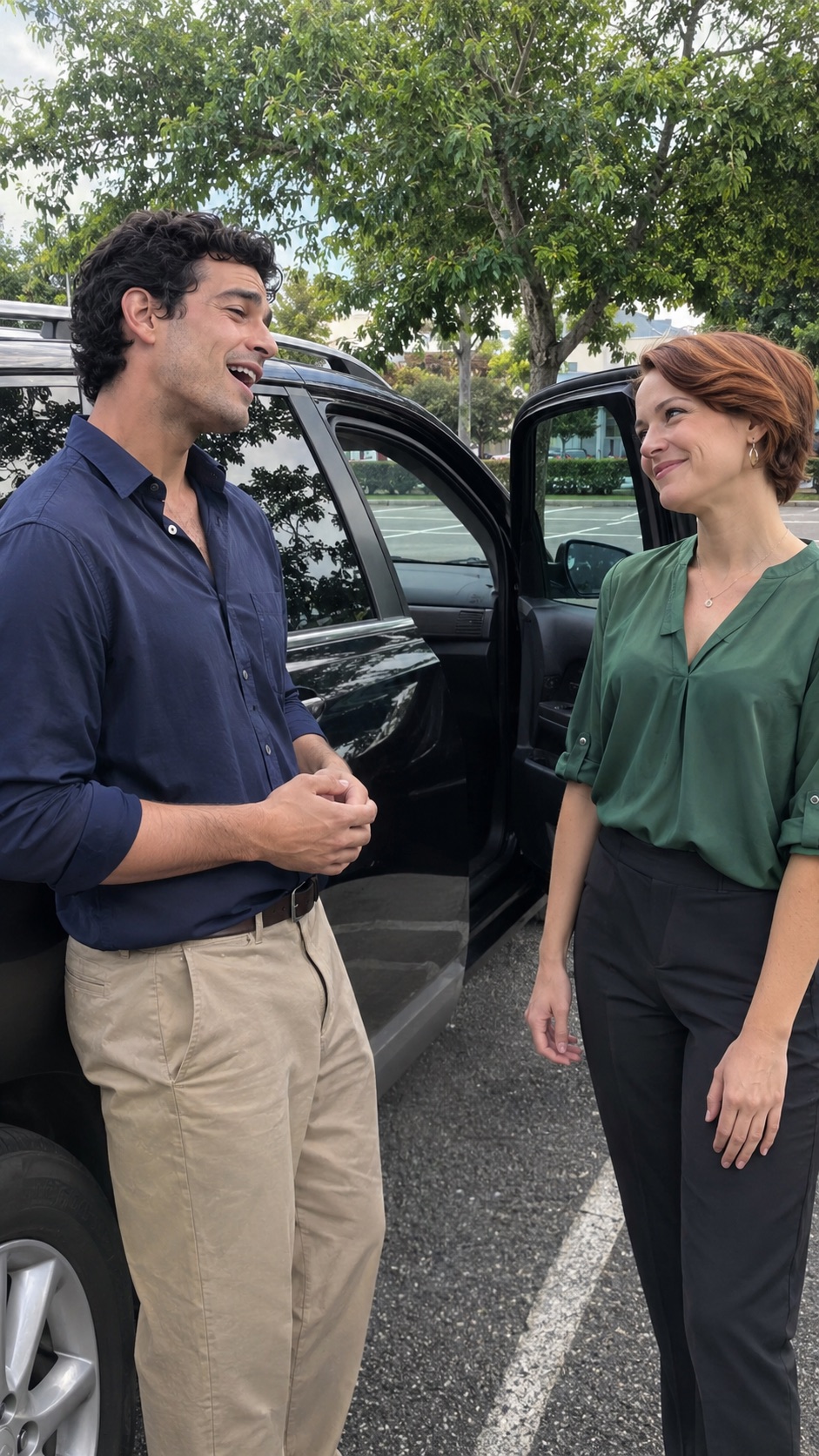
For Prompt 2, we filled the singer with short curly black hair, a dark blue shirt and beige trousers, and the listener with short auburn hair, a green blouse and black trousers. Results illustrate these attempts only; another model or run can interpret the same text differently. The Portuguese version translates the prompts but shows these same English-prompt results.
Start with a picture, then decide whether you need a video
These prompts describe one still frame. Paste them into an image generator that accepts text prompts. A still image can suggest singing through an open mouth, posture and eye contact, but it cannot contain the song, lip-sync or a sequence of gestures.
The video generator on Virgínia Menino IA is a separate workflow: it accepts portraits and uses a preset motion template. It has no field for these text-to-image prompts. Use the prompts below in an image tool, or use the home-page template when your goal is a moving remake.
The prompt formula: people, positions, gesture, setting and camera
Write the cast and positions first, then choose a single moment. A singer looking toward a laughing listener reads more clearly than a request to sing, clap, hug and turn around at once. Describe where each visible hand rests so the model has fewer overlapping limbs to resolve.
Use this structure: [two people and their appearance] + [singer on the left, listener on the right] + [one readable reaction] + [open black SUV in a parking lot] + [light] + [phone-camera framing] + [9:16 portrait composition]. The trend name can provide context, but the visual description should carry the prompt.
The examples use fictional adults so you can build the composition without needing a particular real person’s likeness. Replace the clothing and appearance descriptions with your own choices. The scene is inspired by the meme; it is not a documentary photograph of the original encounter.
Prompt 1: a complete realistic parking-lot scene
Copy the next paragraph as one prompt. It describes a spontaneous phone photo with both people and the open car door visible.
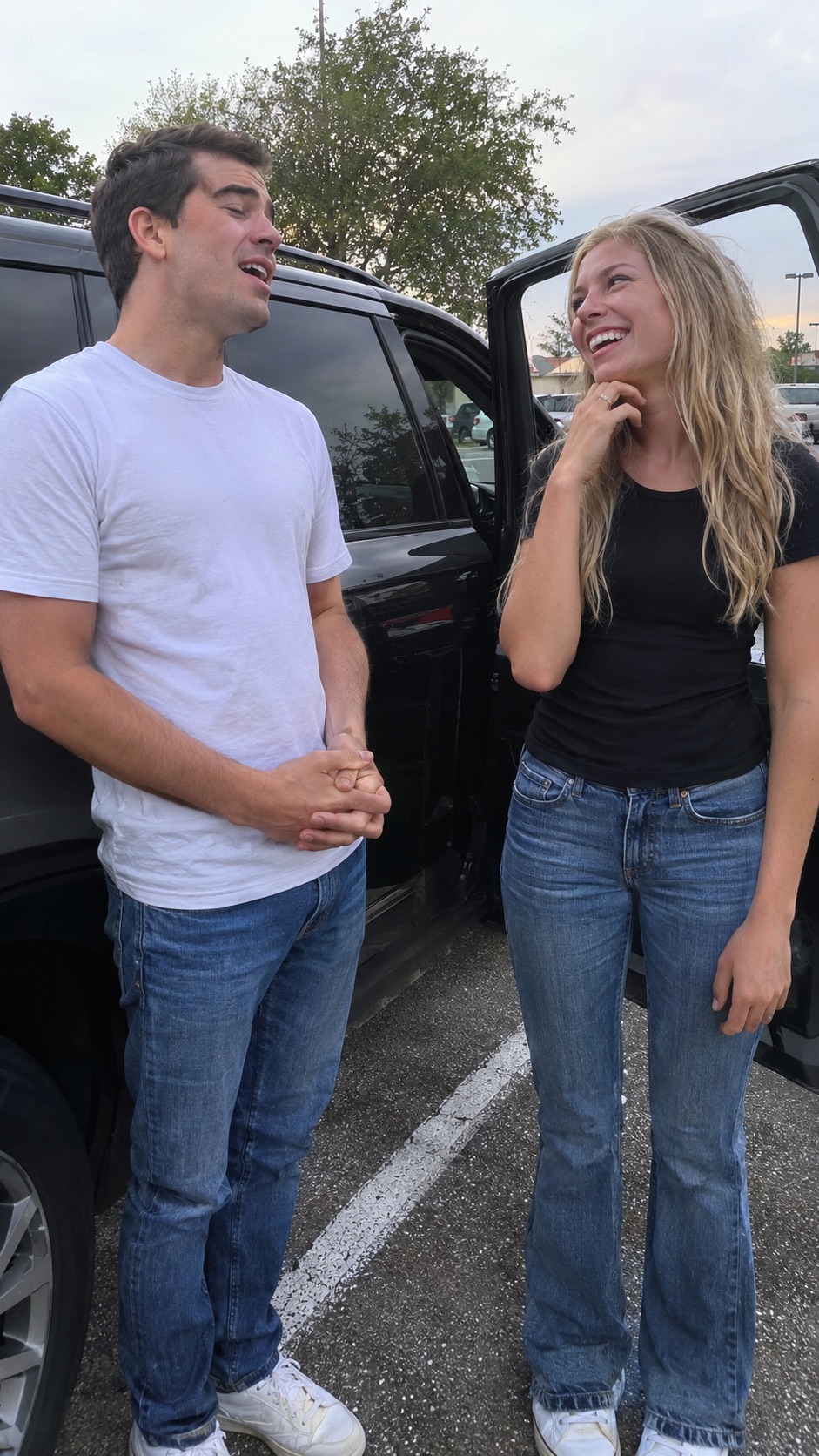
Photorealistic candid smartphone photograph, vertical 9:16 composition. Exactly two fictional adults standing beside a parked black SUV in an outdoor parking lot during soft daylight. On the left, an adult man with short dark hair, a plain white T-shirt and blue jeans appears to sing, mouth slightly open, looking toward the listener, hands loosely clasped at waist height. On the right, an adult woman with long blonde hair, a simple black top and blue jeans laughs warmly while looking at him, one hand held just below her chin without covering her face, the other relaxed by her side. The open passenger door is behind the woman, separate from both bodies. Eye-level medium-wide two-shot, both heads and hands fully inside the frame, believable adult proportions, natural skin texture, subtle phone-camera grain, ordinary parking-lot background, unposed everyday atmosphere. One continuous photograph, no text, no logos, no watermark.
For a closer match to your own visual idea, change only the clothing or appearance first. Keep the left/right positions, shared eye line and open door consistent while comparing results.
Prompt 2: an editable version for your own cast
Replace every bracketed field before generating. Use physical descriptions for fictional people; writing a name alone does not specify their appearance.
Create a realistic vertical 9:16 smartphone photo of exactly two fictional adults beside a black SUV with its passenger door open in a daylight parking lot. LEFT SINGER: [adult appearance, hair, shirt and trousers], standing in three-quarter view toward the right, mouth slightly open as if singing, hands loosely together at waist height. RIGHT LISTENER: [adult appearance, hair, top and trousers], facing the singer with an amused smile, both hands relaxed and clearly separated from the singer. Capture one moment of a playful serenade. Keep both faces unobstructed and both people at a believable adult scale. Eye-level medium-wide framing from head to mid-thigh, balanced space around both people, soft natural light, realistic fabric and skin, casual phone snapshot. The open car door stays behind the listener and does not cross either face. No additional people, text, logos or watermark.
If the generator reverses the cast, simplify the prompt to positions, clothing and eye contact. Add the finer details again after the composition works. A saved seed, when your tool offers one, can make comparisons easier, but does not guarantee identical faces or framing.
Prompt 3: a cleaner frame to animate later
For a possible image-to-video starting frame, keep mouths, hands and silhouettes easy to read. This version uses a restrained reaction and removes hand-to-face contact.
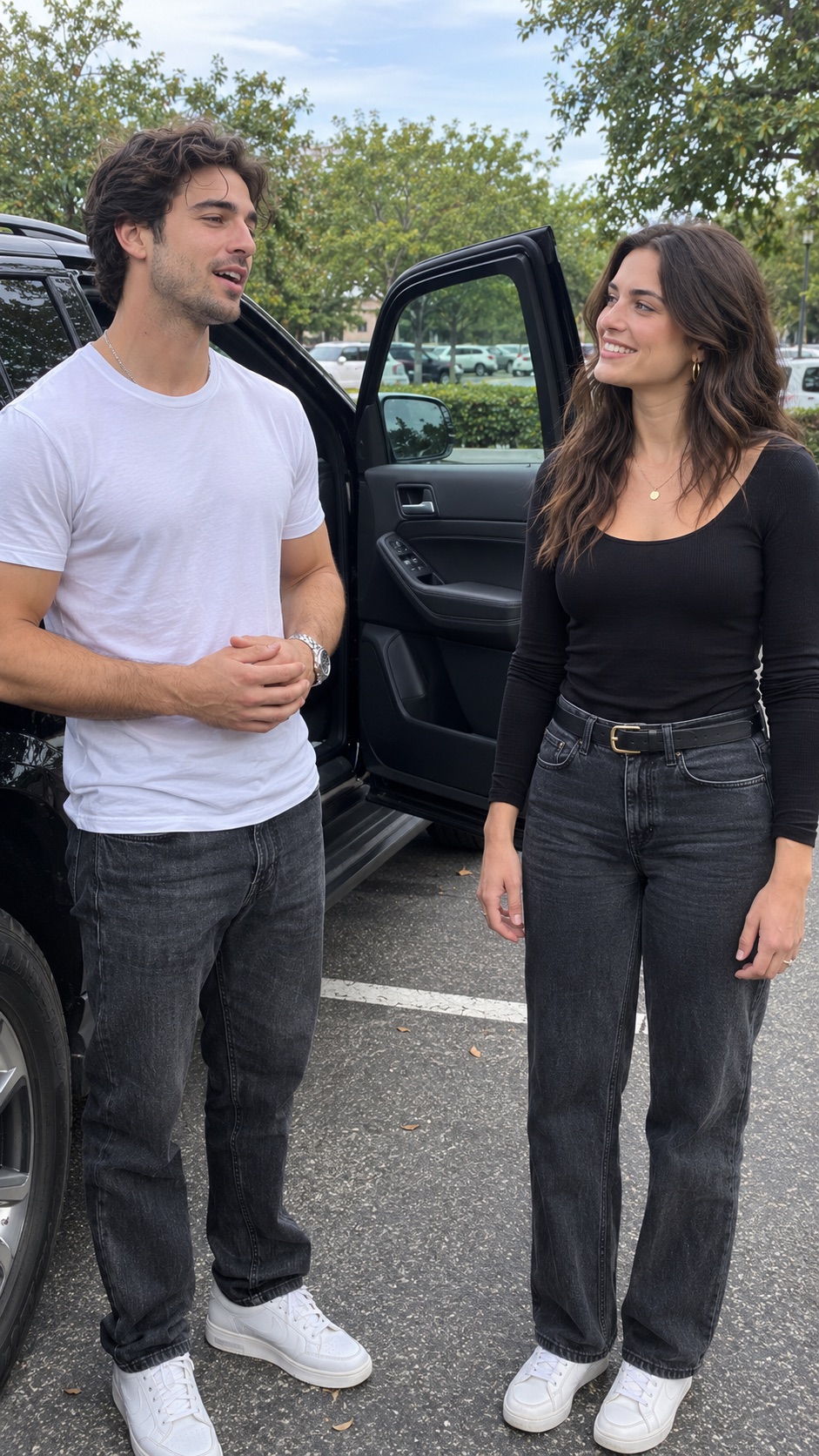
Realistic candid smartphone still, vertical 9:16. Exactly two fictional adults in a daylight parking lot beside an open black SUV passenger door. An adult singer in a white T-shirt stands on the left, turned slightly toward an adult listener in a black top on the right. The singer has a relaxed, slightly open mouth and hands loosely joined below the chest. The listener smiles toward the singer, arms resting naturally at the sides. Both faces are fully visible in three-quarter view, with clear eyes, mouths and jawlines. Keep a small gap between the two bodies, distinct hands and arms, and the car door behind them. Eye-level medium-wide two-shot, both heads and hands inside the frame, space above their heads and around their elbows, soft even daylight, natural skin and clothing texture, consistent perspective. No motion blur, no text, no watermark.
A clean first frame can still develop errors when animated. An image alone does not define the original choreography or soundtrack; a video tool needs its own movement instructions or supported motion reference.
Negative prompt: reduce extra people and tangled hands
If your image tool has a separate negative-prompt field, copy the next paragraph there. If it does not, add a short positive instruction to the main prompt, such as “exactly two people, distinct arms, unobstructed faces”. Negative prompts are guidance, not a guarantee.
extra people, duplicate person, duplicate face, merged bodies, swapped clothing, extra arms, extra fingers, fused fingers, missing hands, twisted wrists, hand covering eyes, obscured mouth, distorted teeth, mismatched gaze, cropped head, cropped hands, car door intersecting body, distorted vehicle, plastic skin, heavy beauty filter, excessive blur, illustration, collage, text, subtitles, logo, watermark
Begin with the simple hands-at-waist pose before trying a shoulder touch or a hand near the mouth. Add one interaction per attempt and inspect the fingers and points of contact at full size.
Want your own face? Use a reference-photo workflow
Text alone cannot reliably reproduce your face. In a tool that supports identity references or image editing, attach one clear portrait per person and state which role belongs to each image. This changes the workflow from pure text-to-image to reference-guided generation. Use photos of yourself or adults who have agreed to appear.
Reference-edit prompt: Use attached portrait 1 only as the identity reference for the adult singer on the LEFT, and attached portrait 2 only as the identity reference for the adult listener on the RIGHT. Preserve each person’s facial features, hairstyle and adult proportions without blending the identities. Place both in a realistic daylight parking lot beside an open black SUV passenger door. The singer faces the listener, mouth slightly open, hands together at waist height. The listener smiles toward the singer with arms relaxed. Keep both faces unobstructed, both heads and hands visible, and the door behind the listener. Natural skin texture, even daylight, candid eye-level smartphone photograph, portrait composition. No extra people, text or watermark.
This example needs two portraits. Do not paste file-reference tokens from another tool unless your tool explicitly supports them. Check the generated faces against the portraits before sharing; a request to preserve identity does not ensure a perfect likeness.
Choose settings, generate, then change one thing at a time
Select portrait 9:16 in the tool’s aspect-ratio control when available. Mentioning the ratio in the prompt may not change the actual canvas. Choose a supported image size and leave room around heads, hands and the open door.
Generate an initial image and check the composition before adding detail. If it works, save the prompt and settings. Change one item, such as the outfit or expression, per attempt so you can tell which change helped. These are starting prompts, not a tested preset for every image model.
| Problem | Prompt revision to try |
|---|---|
| The roles are reversed | Repeat LEFT SINGER and RIGHT LISTENER with a distinct shirt color for each. |
| The image looks like a fashion shoot | Use candid phone snapshot, ordinary daylight and an everyday parking lot. |
| Hands merge with faces or shoulders | Use hands at waist height for the singer and arms by the sides for the listener. |
| The vehicle dominates the frame | Ask for a medium-wide two-shot with the SUV behind the people. |
| Faces or hands are cut off | Ask for head-to-mid-thigh framing and extra space around both people. |
| The face does not look like you | Use a supported identity reference; adding your name to text is insufficient. |
From the image concept to a finished trend video
For a still image, export after checking faces, hands, clothing and the car door. For the preset video on Virgínia Menino IA, return to the generator and upload individual portraits: one for “Just me singing”, or two for “Both of us”, with the singer first and listener second. These prompts do not change the site’s preset scene or movement.
Review a finished video separately for motion and sound. The template adds the matching Portuguese soundtrack after generation; the uploaded face does not clone your singing voice. Label your image or video as AI-generated when sharing it.
FAQ
What should a text-to-image prompt for this trend include?
Specify the singer on the left, listener on the right, one clear reaction, a black SUV with an open door, daylight and vertical phone-camera framing. The full visual description matters more than the trend name alone.
Can I generate my own face with text only?
Text can describe a fictional person but cannot reliably reproduce your identity. Use a tool that supports an attached portrait or identity reference when likeness matters.
Should I use Portuguese or English prompts?
Use a language your image tool supports. This article provides full prompts in each language version; compare a translation only if your chosen tool struggles with the scene. English is not a guarantee of a better result.
Where do I paste the negative prompt?
Use the dedicated negative-prompt field if the image tool offers one. Otherwise, keep the main prompt explicit about the desired result, such as two people with visible faces and separate arms.
Can I paste these prompts into Virgínia Menino IA?
The site’s generator uses portraits and a preset video template, without a free-text image-prompt field. Use these prompts in a separate image generator.
Your Meme da Virgínia e o Menino moment is one photo away
Create my video